
Cheating Detection
Maintain hiring integrity with real-time cheating detection, lip-sync verification, and comprehensive proctoring controls. Prevent fraud, impersonation, and unfair advantages while keeping candidates engaged—without auto-termination.
→ STEP 1
Proctoring Setup — Customize
Security Controls for Each Role
Proctoring Setup —
Customize Security
Controls for Each Role
Cheating detection begins during interview or assessment configuration when HR defines proctoring intensity:
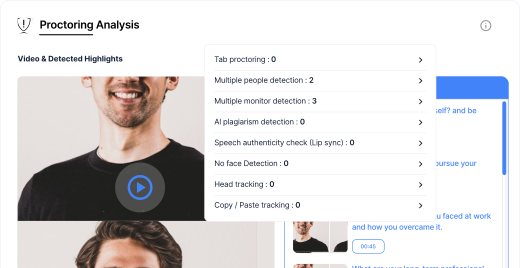

Note: How Integrity Violations Are Treated
InterviewGod never auto-terminates candidates for proctoring violations.
Financial Services and Healthcare organizations use comprehensive proctoring configurations to meet regulatory compliance and security standards.
→ STEP 2
Pre-Assessment Verification — Confirming
Identity Before Evaluation Begins
Pre-Assessment
Verification — Confirming
Identity Before Evaluation
Begins
When KYC verification is enabled, candidates complete identity confirmation before accessing interviews or assessments:
Step 2a: Document Upload
 Candidate uploads government-issued ID
- Supported documents: National ID, driver's license, passport
- System validates document format and readability
- Image quality checks ensure facial photo visibility
Step 2b: Facial Recognition Matching
- Candidate captures live selfie via webcam
- Step 2b: Facial Recognition Matching
- Facial feature matching confirms identity
- Liveness detection prevents photo spoofing
Step 2c: System Readiness Check
- Browser compatibility verification
- Camera and microphone functionality testing
- Internet connection stability assessment
- Full-screen capability confirmation
Identity data is deleted when hiring groups are removed and is never used to create biometric profiles.
What happens when kyc fails
Pharmaceuticals and Consulting firms require KYC verification to ensure candidate authenticity for sensitive roles and intellectual property protection.
→ STEP 3
Live Integrity Monitoring — AI Watches for
Violations While Candidates Assess
Live Integrity Monitoring —
AI Watches for Violations
While Candidates Assess
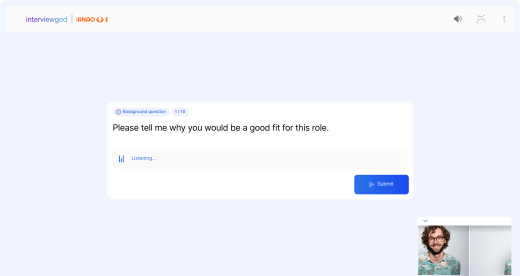
Once the interview or assessment begins, AI-powered proctoring continuously monitors candidate behavior:
Screen & Navigation Monitoring
Full-Screen Enforcement Monitoring:
Tab Switching Detection:
Multiple Monitor Detection:
Camera & Attention Monitoring
Multiple Face Detection:
Looking-Away Tracking:
Lip-Sync Verification:
Response Integrity & Content Analysis
Copy-Paste Monitoring:
AI Plagiarism Analysis (Post-Response):
Session Continuity Policy:
Manufacturing and Construction companies balance security needs with candidate experience, using configurable proctoring for different role sensitivity levels.
→ STEP 4
Event Documentation — Creating Audit
Trails for Every Integrity Incident
Event Documentation —
Creating Audit Trails for
Every Integrity Incident
Every detected proctoring violation is comprehensively
documented for HR review:

Full-Screen Exit Events
- Timestamp of exit + total duration
- Method used (ESC key / minimize / window toggle)
- Count of repeated exit attempts

Browser & Tab Switching
- Every tab switch with timestamp
- Time spent away from assessment
- Repeated pattern detection

Multiple Face Detection
- When additional faces appear/disappear
- Duration of multi-person presence
- Screenshot or short video clip evidence

Looking-Away Patterns
- Frequency + length of off-screen focus
- Direction of gaze (left / right / down)
- Total accumulated looking-away time

Copy-Paste & Input Activity
- Pasted content instances + field location
- Formatting / unusual typing behavior
- Source indicator when detectable

System & Device Context
- Multiple monitor activity
- Configuration changes during session
- Screen layout + resolution metadata
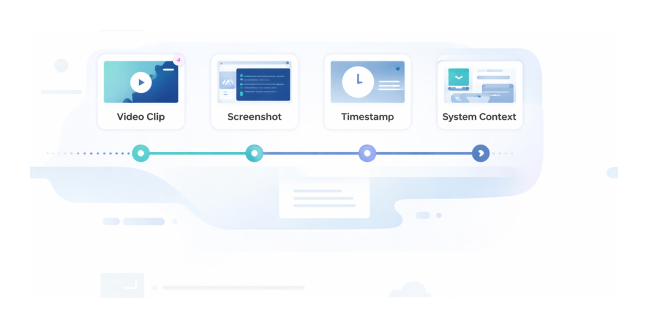
What We Preserve Along with Each Violation
- Short video clips from violation moments
- Timestamped screenshots where relevant
- Candidate's state in the assessment at that time
- Network or technical events that occurred simultaneously
This ensures integrity events are reviewed with environmental and technical context, not in isolation.
Why Comprehensive Logging Matters
Instead of assuming intent from single violations, InterviewGod helps HR distinguish accidental behavior, technical issues, and genuine circumvention patterns — enabling fair, context-aware hiring decisions.
Logistics and Retail & E-Commerce organizations use detailed proctoring logs to make fair decisions during high-volume hiring where false positives could exclude strong candidates.
→ Step 5
Technical Issue Management — Resuming
Sessions Without Unfair Consequences
Technical Issue
Management — Resuming
Sessions Without Unfair
Consequences
InterviewGod's cheating detection distinguishes between integrity violations and legitimate technical difficulties:

Browser Crashes
- Candidates can reload and resume from last checkpoint
- Crash event logged but not counted as violation
- Progress preserved automatically
- No time penalty for reconnection

Internet Connection Drops:
- Temporary connectivity loss allows re-entry
- Disconnection duration logged for context
- Assessment state saved during connection
- Automatic reconnection when network returns

Camera or Microphone Issues
- Hardware disconnection logged but non-terminating
- Candidate prompted to reconnect devices
- Technical failure distinguished from intentional disable
- Session continues with available inputs

Accidental Tab Switches:
- Single brief switches logged with low severity
- Pattern analysis distinguishes mistakes from systematic behavior
- Pattern analysis distinguishes mistakes from systematic behavior
- HR sees frequency before judging intent
Companies hiring in remote or rural areas appreciate session resume and technical issue tolerance, ensuring candidates aren't penalized for infrastructure limitations.
→ STEP 6
Integrity Reporting — Complete
Visibility For Informed Hiring Decisions
Integrity Reporting —
Complete Visibility For
Informed Hiring
Decisions
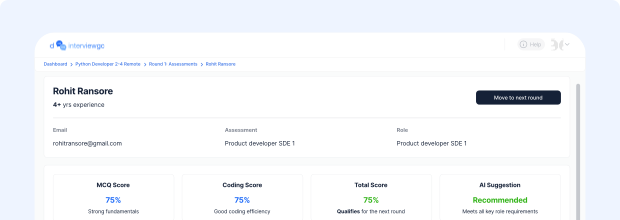
After assessment completion, HR receives detailed proctoring reports integrated with candidate evaluation
Proctoring Report Components
- Overall integrity status (clean / minor / serious concerns)
- Category-wise violation breakdown
- Event timeline with clustered patterns
- Screenshot & short-clip evidence previews
- Technical issue vs violation separation
- KYC verification status (when enabled)
HR Decision Support Tools
- Filter candidates by integrity risk level
- Compare violation trends across candidates
- Review incidents with contextual evidence
- Add reviewer notes & justification remarks
- Override violation severity where appropriate
- Make balanced hiring decisions with full transparency
Logistics and Retail & E-Commerce organizations use detailed proctoring logs to make fair decisions during high-volume hiring where false positives could exclude strong candidates.